
[Python] 파이썬으로 전체 페이지 크롤링 (Feat. 해피빈, Selenium, BeautifulSoup4)
태그: BeautifulSoup4, Database, ElasticSearch, Python, Selenium
카테고리: Database
현재 기부 플랫폼, 사이트들을 크롤링 해와서 한꺼번에 보여주는 프로젝트를 진행하고 있습니다. 이 글에서는 해피빈 사이트의 캠페인들을 크롤링해와 json파일로 저장하는 과정을 소개합니다. ‘스크래핑’과 ‘크롤링’이 조금 다르지만 이 글에서는 크롤링으로 표기했습니다!
☁️ 목적?
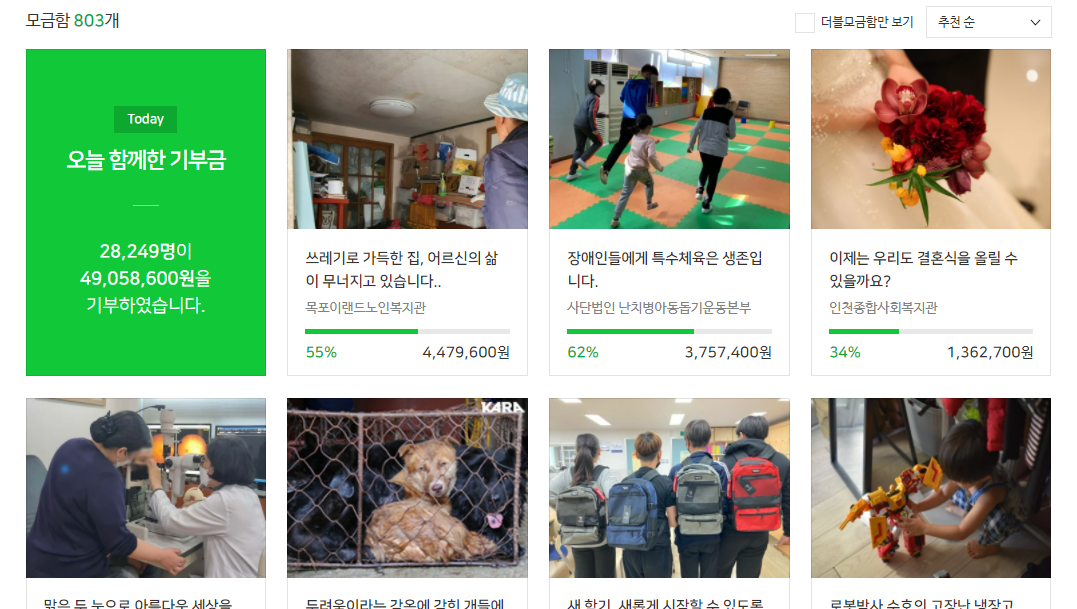
해피빈에서 ‘기부’탭으로 들어가면 각 캠페인이 카드 형태로 나열되어 있고, 카드를 클릭하면 세부 페이지로 들어가게 됩니다.
저는 여기서 각 캠페인 카드의 url을 얻어서 해당 url의 내용을 크롤링 해와야 합니다.
⛅ 웹사이트 구조 파악
사이트 위에서 오른쪽 마우스 > 검사 로 들어가 사이트의 구조를 파악합니다(크롬과 엣지/다른 사이트는 잘 모릅니다). 내가 크롤링 하고자 하는 구역을 찾아 div안으로 계속 들어가봅니다. 마우스를 위로 올리면 구역이 표시됩니다.
해피빈은 id가 rdonaboxes, class가 card_wrap인 div 안에
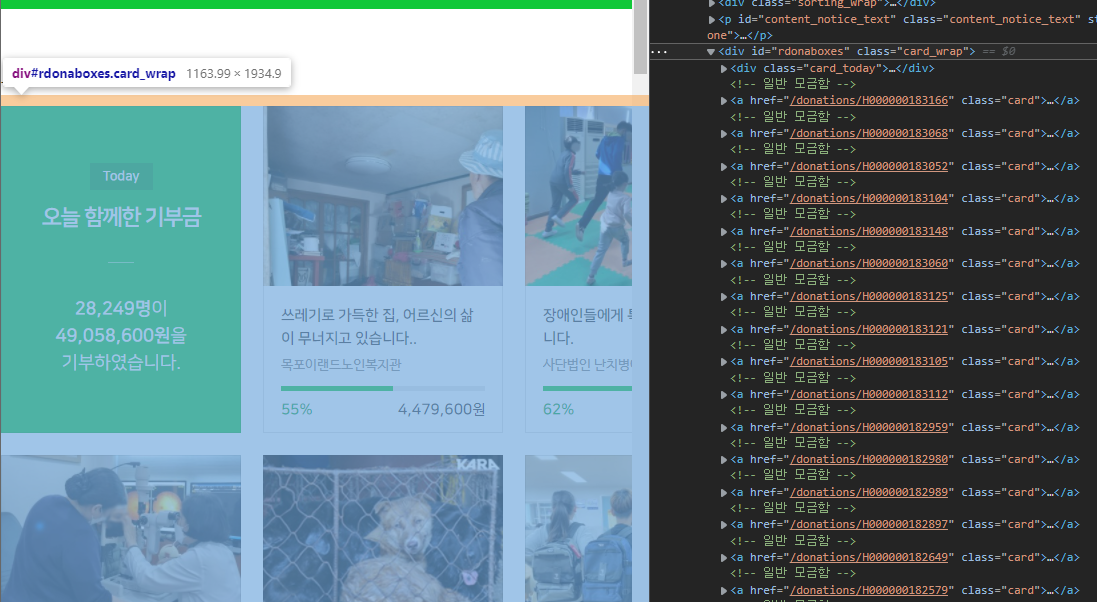
class가 card이고 각 세부 페이지로 링크되어있는 a태그로 구성되어 있습니다.
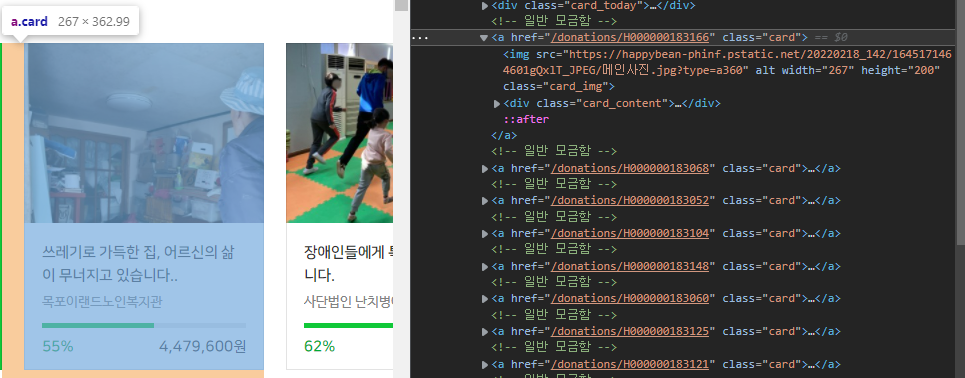
각 캠페인들은 “H000000183166”같은 고유 아이디를 갖고 있고 세부 페이지는
1
https://happybean.naver.com/donations/ + [캠페인 아이디]
이렇게 구성되어 있습니다.
저는 전체 캠페인을 모두 크롤링 해와야 하기 때문에 https://happybean.naver.com/donation/DonateHomeMain에서 ‘더보기’ 버튼을 끝까지 눌러 캠페인 전체가 나타나도록 한 다음 크롤링 해 올 것입니다.
⛈️ Selenium 세팅
정적 페이지만 크롤링(스크래핑) 한다면 BeautifulSoup4으로도 충분하지만, 동적으로 페이지 url을 모아와야 하므로 Selenium을 사용합니다. 이 외에도 로그인을 해서 들아간다던가 하는 작업도 Selenium으로 가능합니다.
먼저 크롬 드라이버를 설치한 뒤 진행합니다. (크롬 드라이버를 설치하는 방법은 이 글에 소개하지 않습니다.)
1
2
3
4
5
6
7
8
9
10
11
12
13
14
15
16
17
18
19
20
21
def set_chrome_driver():
    options = webdriver.ChromeOptions()
    options.add_argument("headless")  # 웹 브라우저를 시각적으로 띄우지 않는 headless chrome 옵션
    options.add_argument("lang=ko_KR")  # 언어 설정
    options.add_experimental_option(
        "excludeSwitches", ["enable-logging"]
    )  # 개발도구 로그 숨기기
    options.add_argument("start-maximized") # 창 크기 최대로
    options.add_argument("disable-infobars")
    options.add_argument("--disable-extensions")
    driver = webdriver.Chrome(
        service=Service(ChromeDriverManager().install()), options=options
    )
    return driver

if __name__ == "__main__":
    data = [] # 크롤링 결과 들어갈 리스트

    driver = set_chrome_driver()
    driver.get(_URL_DONATE_LIST)
    # _URL_DONATE_LIST = "https://happybean.naver.com/donation/DonateHomeMain"
필요한 option을 추가한 뒤 driver를 설정해줍니다.
🌤️ ‘더보기’ 버튼 끝까지 클릭
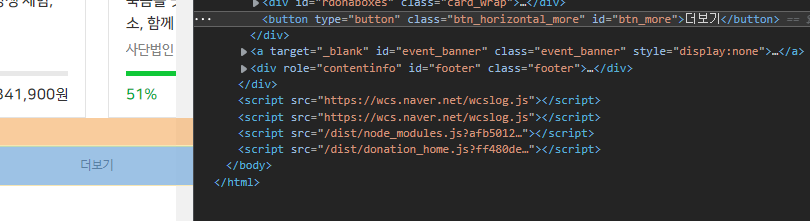
더보기 버튼의 id가 ‘#btn_more’인 것을 알아냈습니다.
캠페인 수가 적은 다른 카테고리에서 더보기 버튼을 끝까지 누르면 버튼의 속성이 display:none이 되는것을 확인 했기때문에, 버튼이 none이 될때까지 계속 버튼을 눌러주면 됩니다.
버튼을 클릭 할 수 있을때까지 1초 기다려 주게 설정했고, 만약 1초안에 클릭하지 못하면 TimeoutException이 발생하게 됩니다.
1
2
3
4
5
6
7
8
# 더보기 버튼 끝까지 클릭
while driver.find_element(By.CSS_SELECTOR, "#btn_more").is_displayed:
    try:
        WebDriverWait(driver, 1).until(
            EC.element_to_be_clickable((By.CSS_SELECTOR, "#btn_more"))
        ).click()
    except TimeoutException:
        break
성공적으로 더보기 버튼을 끝까지 눌렀다면, 이제 모든 캠페인이 페이지에 노출되었을 겁니다.
🌥️ URL 추출
<a> 태그로 구성되어있는 각 캠페인 카드의 클래스는 card였기 때문에 클래스가 card인 elements를 가져옵니다.
이제 반복문을 돌면서 각 캠페인 카드에 대한 url을 얻고, 크롤링을 진행합니다.
.get_attribute("")로 해당 html 태그의 속성을 얻을 수 있는데, 이 메소드를 이용해 캠페인 url과 썸네일 이미지 주소를 추출했습니다.
1
2
3
4
5
6
7
8
9
# 각 캠페인 카드에 대한 크롤링 진행
html_campaign_cards = driver.find_elements(By.CLASS_NAME, "card")
for card in html_campaign_cards:
    campaign_url = card.get_attribute("href")
    campaign_thumbnail = card.find_element(
        By.CSS_SELECTOR, "a > img"
    ).get_attribute("src")
    crawling_each_campaign(campaign_url, campaign_thumbnail)
driver.close()
🌦️ 세부 페이지 크롤링
crawling_each_campaign() 라는 함수를 정의해서 data에 캠페인 객체를 append해주도록 구현했는데, 각 세부 페이지를 크롤링(스크래핑) 하는것은 Selenium을 사용하지 않고 BeautifulSoup4을 이용 했습니다.
Selenium은 동적 페이지를 크롤링 할 수 있다는 장점이 있지만 느리기 때문에, 정적 페이지인 세부페이지는 bs4(beautifulSoup4)를 사용했습니다.
세부페이지 크롤링(스크래핑)하는 소스코드
1
2
3
4
5
6
7
8
9
10
11
12
13
14
15
16
17
18
19
20
21
22
23
24
25
26
27
28
29
30
31
32
33
34
35
36
37
38
39
40
41
42
43
44
45
46
47
48
49
50
51
52
53
54
55
56
57
58
59
60
61
62
63
64
65
66
67
68
69
70
71
72
73
74
75
76
77
78
79
80
81
82
83
84
85
86
87
88
89
90
91
92
93
94
95
96
97
class Campaign:
    def __init__(
        self,
        campaign_id,
        title,
        category,
        theme,
        body,
        organization_name,
        thumbnail,
        due_date,
        start_date,
        target_price,
        status_price,
    ):
        self.campaign_id = campaign_id
        self.title = title
        self.category = category
        self.theme = theme
        self.body = body
        self.organization_name = organization_name
        self.thumbnail = thumbnail
        self.due_date = due_date
        self.start_date = start_date
        self.target_price = target_price
        self.status_price = status_price

def get_title(soup: BeautifulSoup):
    return soup.find("h3", "tit").text


def get_theme_and_category(soup: BeautifulSoup):
    _theme = soup.find("a", "theme").text.split(">")
    theme = _theme[1].strip()
    category = _theme[0].strip()
    return theme, category


def get_body(soup: BeautifulSoup):
    body = soup.select_one(
        "#container > div > div.collect_content > div > ul.intro_lst.editor_base"
    ).text.strip()
    return body


def get_organization_name(soup: BeautifulSoup):
    return soup.select_one(
        "#container > div > div.collect_side > div.section_group > div > h3 > span > a > strong"
    ).text.strip()


def get_dates(soup: BeautifulSoup):
    _term = soup.select_one(
        "#container > div > div.collect_side > div.section_status > div.term_area > p > strong"
    ).text.split("~")
    start_date = _term[0].strip()
    due_date = _term[1].strip()
    return start_date, due_date


def get_prices(soup: BeautifulSoup):
    status_price = soup.select_one(
        "#container > div > div.collect_side > div.section_status > div.num_area > p.status_num > strong"
    ).text.replace(",", "")
    target_price = soup.select_one(
        "#container > div > div.collect_side > div.section_status > div.num_area > p.detail_num.v2 > strong > span"
    ).text.replace(",", "")
    return status_price, target_price


def crawling_each_campaign(url: str, src: str):
    response = requests.get(url)
    soup = BeautifulSoup(response.content, "html.parser")

    campaign_id = url.split("/")[4]
    title = get_title(soup)
    theme, category = get_theme_and_category(soup)
    body = get_body(soup)
    organization_name = get_organization_name(soup)
    thumbnail = src
    start_date, due_date = get_dates(soup)
    status_price, target_price = get_prices(soup)

    campaign = Campaign(
        campaign_id,
        title,
        category,
        theme,
        body,
        organization_name,
        thumbnail,
        due_date,
        start_date,
        target_price,
        status_price,
    )
    data.append(campaign.__dict__)
📍 selector 얻기
bs4를 이용하여 크롤링 해오는 방법은 쉽게 찾을 수 있어 자세하게 언급은 하지 않겠습니다만, 위 코드에 soup.select_one()으로 한번에 찾아왔는데 이건 하나하나 다 써준게 아니라 개발자도구(검사) 에서 추출해 온 것입니다.
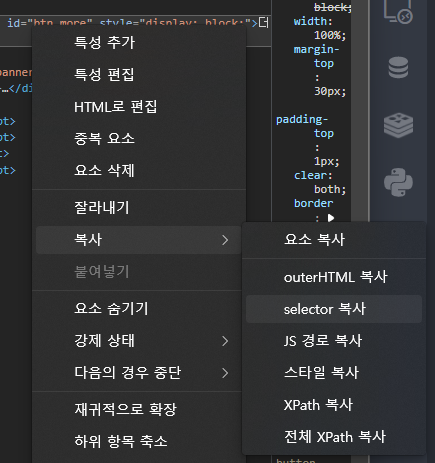
개발자도구 창에서 원하는 것을 클릭 > 복사 > selector복사를 누르면 쉽게 path를 얻을 수 있습니다.
Selenium으로 크롤링 할 때는 XPath도 유용하게 쓰일 수 있기때문에 어렵게 구하지 말고 이렇게 복사하면 됩니다.
📍 Object -> 딕셔너리 변환
json으로 변환하여 저장하고 후에 엘라스틱 서치에 삽입할 예정인데, json으로 쉽게 변환하려면 딕셔너리 형태로 변환해야 하므로 Object.__dict__로 Campaign 객체를 딕셔너리로 변환해줍니다.
🌨️ json으로 저장
1
2
3
# json 으로 저장
with open('data\happybean.json', "w", encoding = 'utf-8') as f:
    json.dump(data, f, ensure_ascii = False, indent = 4)
list[dict] 형식으로 저장된 data 리스트를 json모듈을 이용해 json파일로 저장해줍니다.
📃 전체 소스코드
세부페이지 크롤링(스크래핑)하는 소스코드
1
2
3
4
5
6
7
8
9
10
11
12
13
14
15
16
17
18
19
20
21
22
23
24
25
26
27
28
29
30
31
32
33
34
35
36
37
38
39
40
41
42
43
44
45
46
47
48
49
50
51
52
53
54
55
56
57
58
59
60
61
62
63
64
65
66
67
68
69
70
71
72
73
74
75
76
77
78
79
80
81
82
83
84
85
86
87
88
89
90
91
92
93
94
95
96
97
98
99
100
101
102
103
104
105
106
107
108
109
110
111
112
113
114
115
116
117
118
119
120
121
122
123
124
125
126
127
128
129
130
131
132
133
134
135
136
137
138
139
140
141
142
143
144
145
146
147
148
149
150
151
152
153
154
155
156
157
158
159
160
161
162
163
164
165
166
167
168
169
170
171
from lib2to3.pgen2 import driver
from selenium import webdriver
import requests
from bs4 import BeautifulSoup
from selenium import webdriver
from selenium.webdriver.chrome.service import Service
from webdriver_manager.chrome import ChromeDriverManager
from selenium.webdriver.common.by import By
from selenium.webdriver.support.ui import WebDriverWait
from selenium.webdriver.support import expected_conditions as EC
from selenium.common.exceptions import TimeoutException
import time
import json

_URL_DONATE_LIST = "https://happybean.naver.com/donation/DonateHomeMain"


class Campaign:
    def __init__(
        self,
        campaign_id,
        title,
        category,
        theme,
        body,
        organization_name,
        thumbnail,
        due_date,
        start_date,
        target_price,
        status_price,
    ):
        self.campaign_id = campaign_id
        self.title = title
        self.category = category
        self.theme = theme
        self.body = body
        self.organization_name = organization_name
        self.thumbnail = thumbnail
        self.due_date = due_date
        self.start_date = start_date
        self.target_price = target_price
        self.status_price = status_price


def get_title(soup: BeautifulSoup):
    return soup.find("h3", "tit").text


def get_theme_and_category(soup: BeautifulSoup):
    _theme = soup.find("a", "theme").text.split(">")
    theme = _theme[1].strip()
    category = _theme[0].strip()
    return theme, category


def get_body(soup: BeautifulSoup):
    body = soup.select_one(
        "#container > div > div.collect_content > div > ul.intro_lst.editor_base"
    ).text.strip()
    return body


def get_organization_name(soup: BeautifulSoup):
    return soup.select_one(
        "#container > div > div.collect_side > div.section_group > div > h3 > span > a > strong"
    ).text.strip()


def get_dates(soup: BeautifulSoup):
    _term = soup.select_one(
        "#container > div > div.collect_side > div.section_status > div.term_area > p > strong"
    ).text.split("~")
    start_date = _term[0].strip()
    due_date = _term[1].strip()
    return start_date, due_date


def get_prices(soup: BeautifulSoup):
    status_price = soup.select_one(
        "#container > div > div.collect_side > div.section_status > div.num_area > p.status_num > strong"
    ).text.replace(",", "")
    target_price = soup.select_one(
        "#container > div > div.collect_side > div.section_status > div.num_area > p.detail_num.v2 > strong > span"
    ).text.replace(",", "")
    return status_price, target_price


def crawling_each_campaign(url: str, src: str):
    response = requests.get(url)
    soup = BeautifulSoup(response.content, "html.parser")

    campaign_id = url.split("/")[4]
    title = get_title(soup)
    theme, category = get_theme_and_category(soup)
    body = get_body(soup)
    organization_name = get_organization_name(soup)
    thumbnail = src
    start_date, due_date = get_dates(soup)
    status_price, target_price = get_prices(soup)

    campaign = Campaign(
        campaign_id,
        title,
        category,
        theme,
        body,
        organization_name,
        thumbnail,
        due_date,
        start_date,
        target_price,
        status_price,
    )
    data.append(campaign.__dict__)


def set_chrome_driver():
    options = webdriver.ChromeOptions()
    options.add_argument("headless")  # 웹 브라우저를 띄우지 않는 headless chrome 옵션
    options.add_argument("lang=ko_KR")  # 언어 설정
    options.add_experimental_option(
        "excludeSwitches", ["enable-logging"]
    )  # 개발도구 로그 숨기기
    options.add_argument("start-maximized")
    options.add_argument("disable-infobars")
    options.add_argument("--disable-extensions")
    driver = webdriver.Chrome(
        service=Service(ChromeDriverManager().install()), options=options
    )
    return driver


if __name__ == "__main__":

    print("... 해피빈 크롤링 시작 ...")
    start = time.time()  # 시작시간

    data = []

    driver = set_chrome_driver()
    driver.get(_URL_DONATE_LIST)

    # 더보기 버튼 끝까지 클릭
    while driver.find_element(By.CSS_SELECTOR, "#btn_more").is_displayed:
        try:
            WebDriverWait(driver, 1).until(
                EC.element_to_be_clickable((By.CSS_SELECTOR, "#btn_more"))
            ).click()
        except TimeoutException:
            break

    # 각 캠페인 카드에 대한 크롤링 진행
    html_campaign_cards = driver.find_elements(By.CLASS_NAME, "card")
    for card in html_campaign_cards:
        campaign_url = card.get_attribute("href")
        campaign_thumbnail = card.find_element(
            By.CSS_SELECTOR, "a > img"
        ).get_attribute("src")
        crawling_each_campaign(campaign_url, campaign_thumbnail)
    driver.close()

    end = time.time()  # 종료 시간
    print(f"{end - start:.5f} sec")

    print("... 해피빈 크롤링 끝 ...")

    # json 으로 저장
    with open("data\happybean.json", "w", encoding="utf-8") as f:
        json.dump(data, f, ensure_ascii=False, indent=4)
이렇게 하면 엘라스틱서치에 넣을 재료 준비는 끝입니다 ✨
댓글남기기